Uncensored AI Image Generator, Local and Free: Qwen-Image 2.1 Turbo Tested
Looking for an uncensored AI image generator with no filter? Run Qwen-Image 2.1 Turbo locally and free on Mac or Windows. We tested speed, quality and what 'uncensored' really changes.
The most reliable uncensored AI image generator is one that runs on your own computer. Online generators add their own content filters, usage limits and accounts. An open model running locally has no server-side filter, no prompt logging and no credits. Qwen-Image 2.1 Turbo is one of the best open models for this, and it now runs free in TopLocal Studio on Mac and Windows.
We tested it on our own machine against the community Viggle Turbo, Z-Image-Turbo and the abliterated "uncensored" text encoder. Same prompts, same seed. This page has the numbers, the pictures, and a plain answer to what "uncensored" actually means for this model.
Tested October 11, 2026, on a MacBook Pro with an M5 Pro chip and 64 GB of unified memory.
What is Qwen-Image 2.1 Turbo?
Qwen-Image-2.1-Turbo is a distilled checkpoint of Qwen-Image 2.1. It is the same 7B image model, trained to finish in 8 steps at CFG 1 instead of about 40 steps. It has a fixed sampling schedule of its own. The text encoder (Qwen3-VL-8B) and the VAE are the same as in Qwen-Image 2.1.
TopLocal Studio runs it through stable-diffusion.cpp, using the AtomicChat AD-Q4_K GGUF (4.2 GB). The full download, including the encoder and VAE, is about 9.9 GB.
Speed: tested on an M5 Pro
Four prompts, 1024 × 1024, seed 42. Every run starts a fresh process, so the times include loading the model, the same wait you get in the app.
| Model | Steps | Time per image |
|---|---|---|
| Z-Image-Turbo (the app's default) | 8 | about 35 s |
| Qwen-Image 2.1 Viggle Turbo v0.2.1, Q4 | 6 | 133–149 s |
| Qwen-Image 2.1 Turbo, AD-Q4_K | 8 | 130–135 s |
| Qwen-Image 2.1 Turbo + abliterated "uncensored" encoder | 8 | 143–151 s |
Qwen-Image 2.1 Turbo takes about two minutes per image on this Mac. It is about four times slower than Z-Image-Turbo. That is why Z-Image stays the default and Qwen is the "high quality" option you pick when the picture matters more than the wait.
Quality: same prompts, same seed
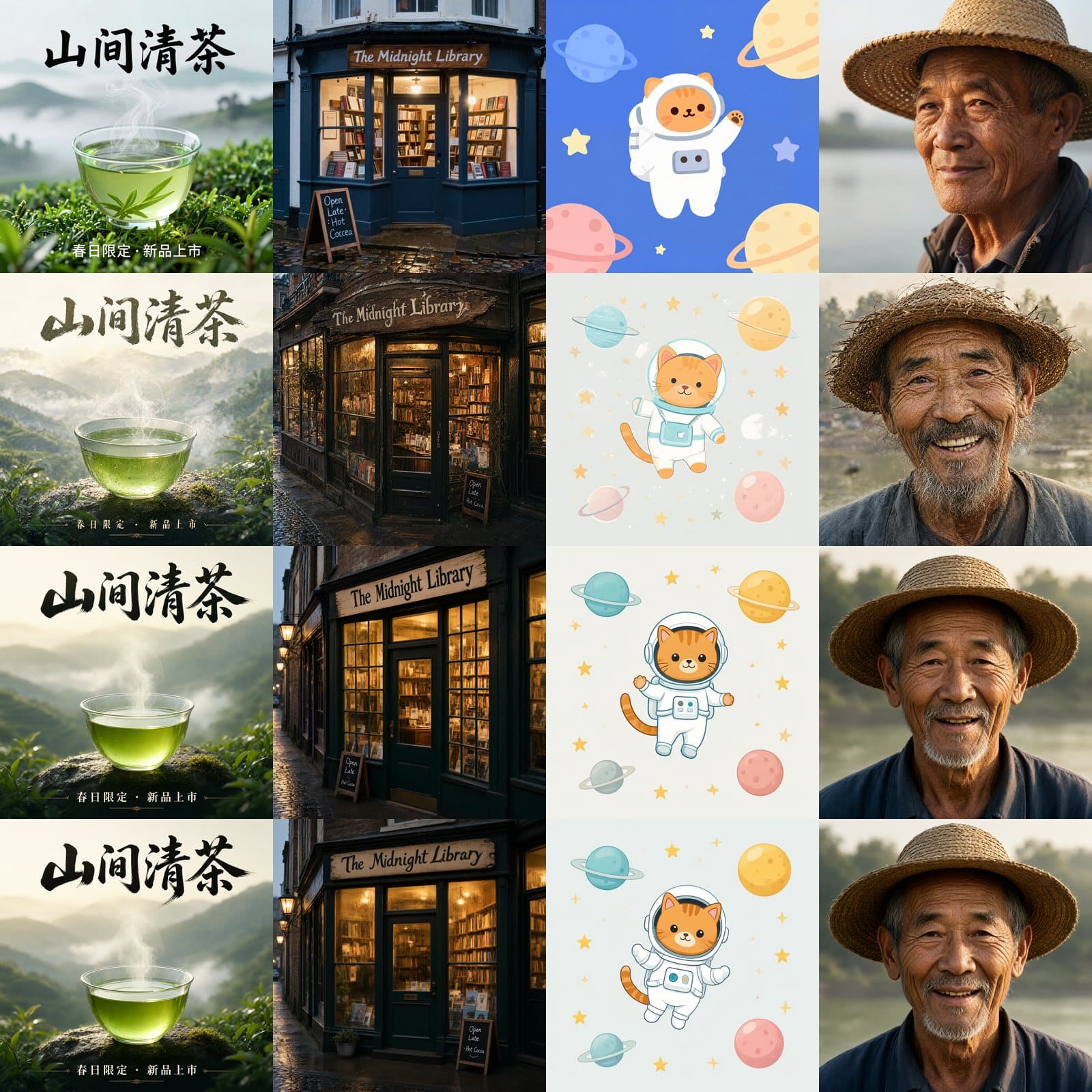
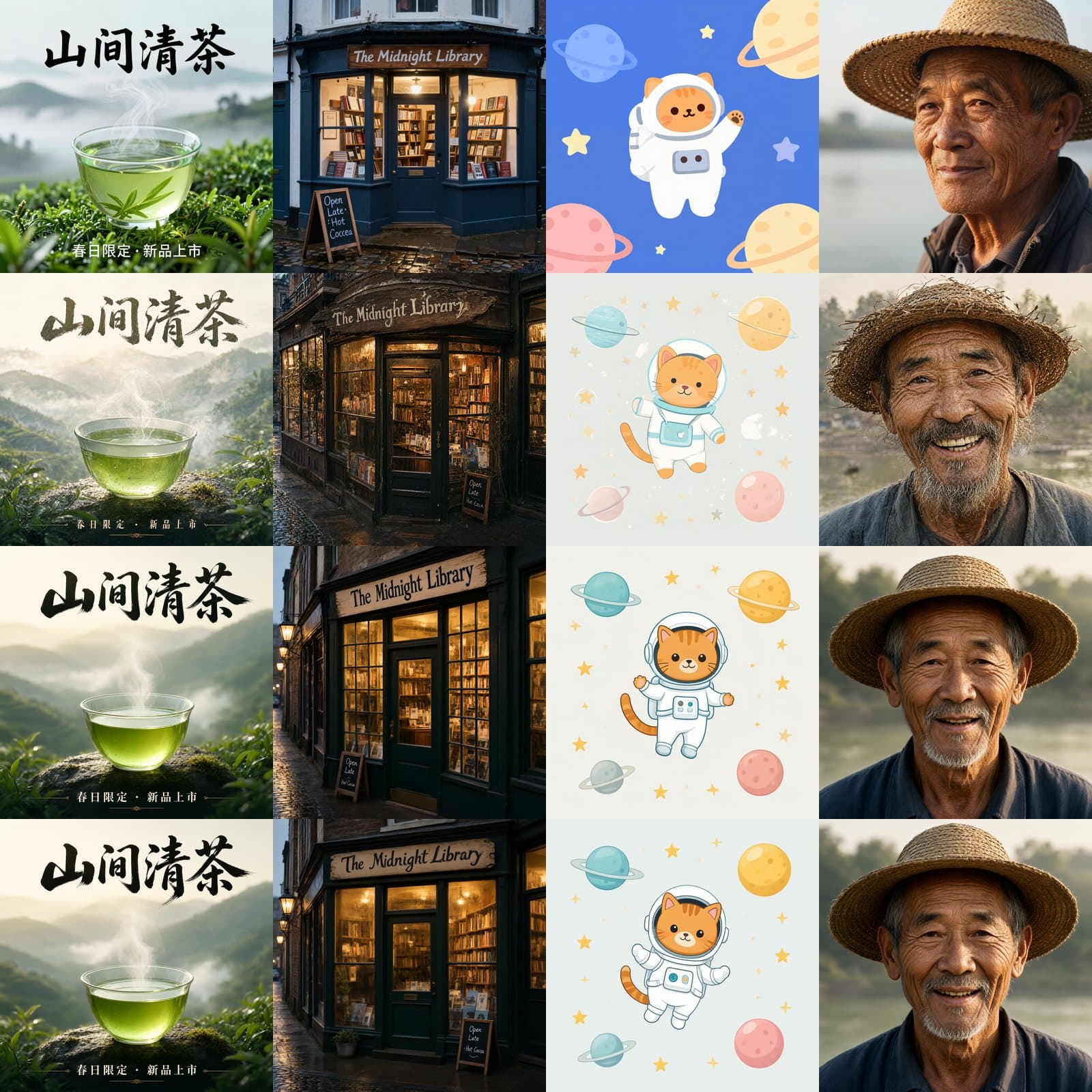
Rows from top: Z-Image-Turbo, Viggle Turbo v0.2.1, Qwen-Image 2.1 Turbo, Qwen-Image 2.1 Turbo with the abliterated encoder. Columns: Chinese tea poster, English shop sign, flat illustration, portrait.
What we saw:
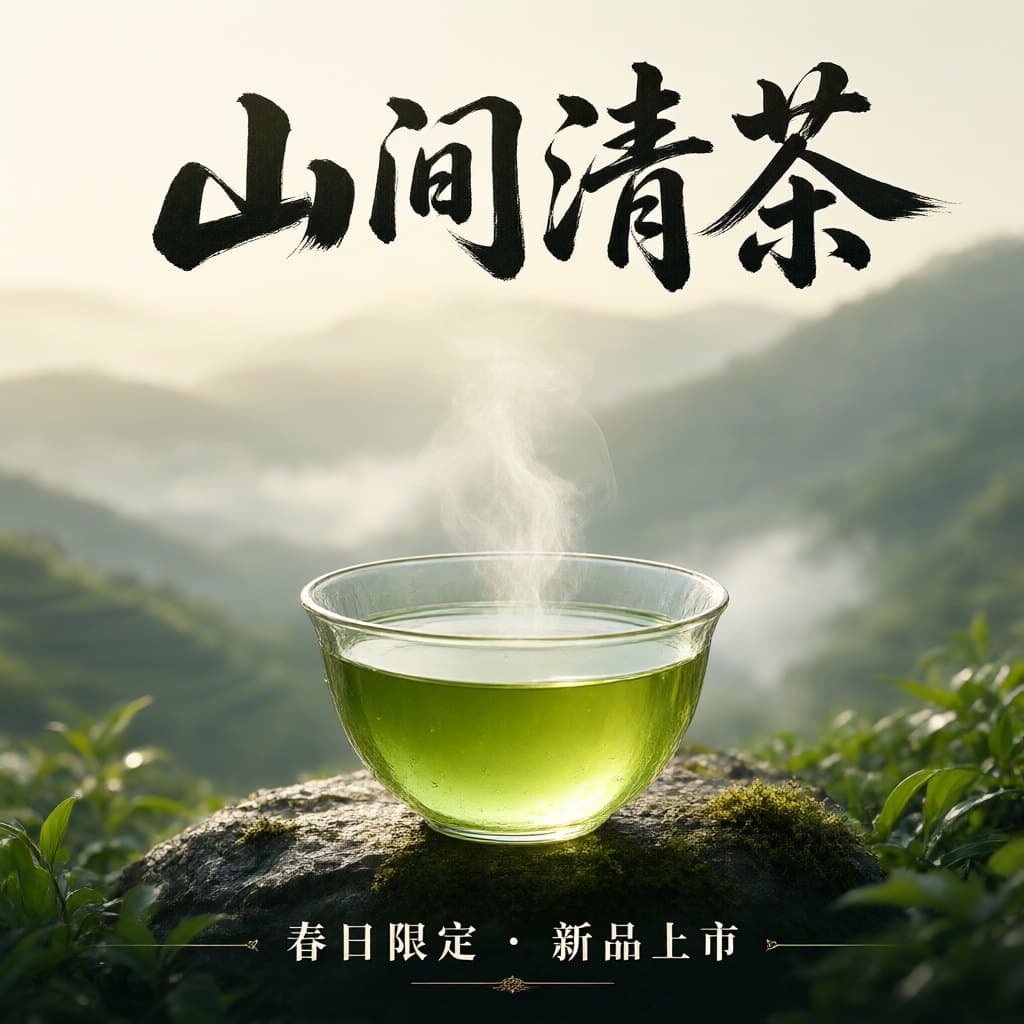
- Chinese calligraphy. The brush lettering of "山间清茶" is the strongest of all four models, and the small line below it is correct. Z-Image writes the same words, but in a plain typeface.
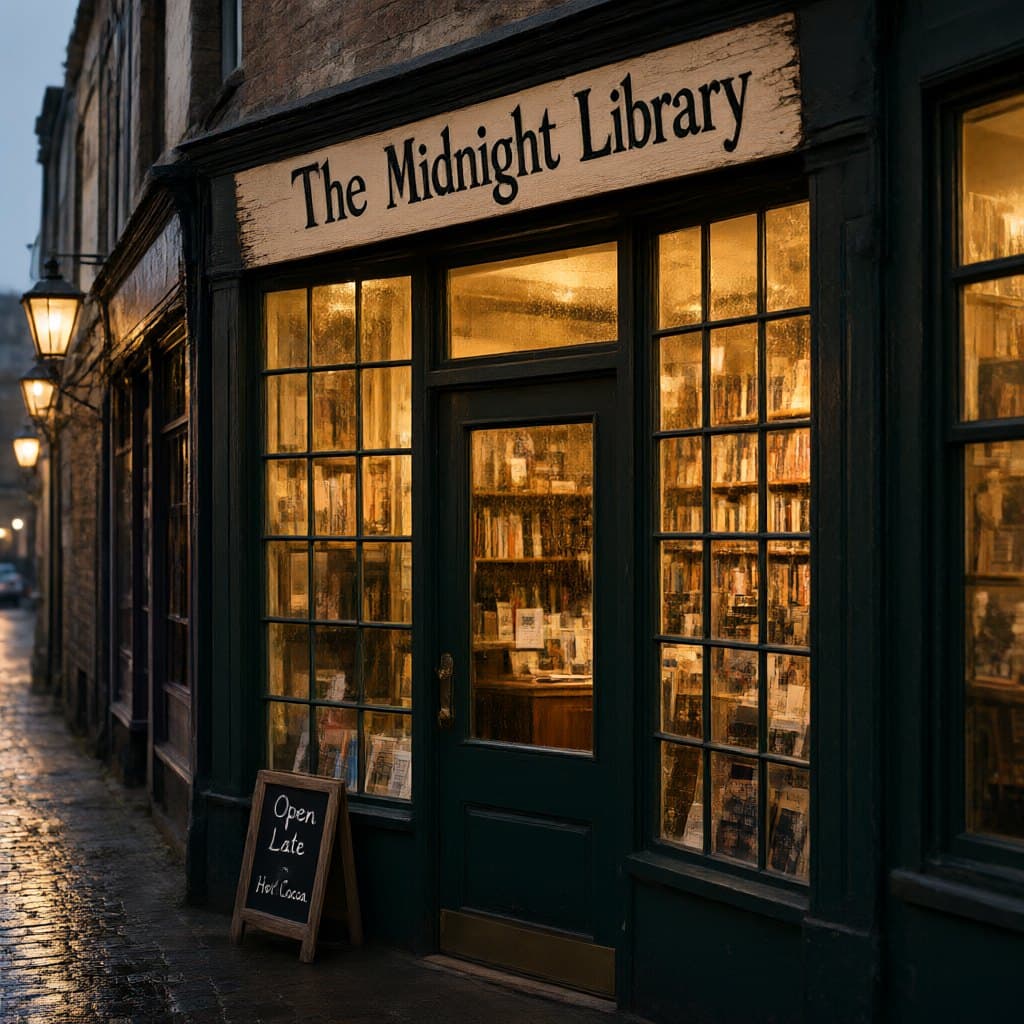
- English text. "The Midnight Library" is spelled correctly. The small chalkboard says "Hot Cocoa", where Z-Image wrote "Coccea".
- Illustration. Clean shapes and no stray marks. The Viggle Turbo version of the same prompt had a white blotch on the right side.
- Portrait. Natural skin and light. Viggle is a little sharper but looks over-sharpened. Turbo looks more like a photograph.
Is Qwen-Image 2.1 Turbo an uncensored AI image generator?
Searches for "Qwen-Image 2.1 Turbo uncensored" usually lead to the AtomicChat abliterated encoder. It is worth knowing what it is before you download 5 GB.
- It is only the text encoder. It is Qwen3-VL-8B with its "refusal direction" removed. The image model itself is unchanged.
- The open Qwen-Image pipeline has no content filter to remove. Moderation exists only in Qwen's hosted service. The open weights draw what their training data taught them.
- On pictures, it made no measurable difference. Its authors tested 45 sensitive prompts, and none changed outcome. Our test agrees: the bottom row of the grid is almost identical to the row above it.
- It was a little slower for us. The file is larger, and each image took about 12 seconds more.
So the stock pipeline you run locally is already as open as the "uncensored" one: there is no filter between your prompt and the picture. TopLocal Studio uses the standard encoder, and you get the same pictures. What the model can draw is set by what Qwen trained it on, not by the encoder.
How to run a local AI image generator with Qwen-Image 2.1 Turbo
- Install TopLocal Studio for Mac (Apple Silicon) or Windows 10/11.
- Open Image → Generate and choose Qwen-Image 2.1 Turbo in the model list.
- The app downloads the model (about 9.9 GB) the first time. After that, everything runs offline.
- Write your prompt. Put any words you want in the picture inside quotes, and keep them short.
It is recommended for computers with 32 GB of memory or more. On Windows it runs through Vulkan, so NVIDIA, AMD and Intel GPUs all work without installing CUDA.
If you prefer to build the pipeline yourself, stable-diffusion.cpp takes the denoiser, encoder and VAE as separate files. Use Turbo's own sigma schedule: 1.0, 0.978453, 0.95418, 0.926626, 0.89508, 0.845148, 0.704534, 0.414568, 0.0, with 8 steps, CFG 1 and the Euler sampler.
License
Qwen-Image 2.1 and its Turbo checkpoint use the Qwen Research License: research and non-commercial use only. If you need images for commercial work, use Z-Image-Turbo (Apache-2.0) instead. The app shows each model's license before you download it.
FAQ
Is Qwen-Image 2.1 Turbo better than Z-Image-Turbo?
For calligraphy, layout and photographic light, yes, in our tests. For speed, no: Z-Image-Turbo was about four times faster. Z-Image-Turbo can also be used commercially.
Does Qwen-Image 2.1 Turbo run on a Mac?
Yes, on Apple Silicon. On an M5 Pro with 64 GB, one 1024 × 1024 image took about 130 seconds, including loading the model.
Is this an AI image generator with no filter?
Yes. Running locally, there is no content filter, no prompt moderation and no account. What it draws depends on what the model learned in training. Qwen removed NSFW images from its training data, so it is not built for explicit content.
Is it free?
Generating is free: the model runs on your own hardware, with no credits or subscription, and the model download is free. The app itself is open source on GitHub.
Do I need the uncensored version?
No. The open model has no content filter. The abliterated encoder changed nothing measurable in the pictures, and it was slower.
Is Viggle Turbo or the official Turbo better?
They ran at the same speed in our test. The official Turbo gave cleaner illustrations and more natural portraits, so TopLocal Studio uses it.
Does Qwen-Image 2.1 Turbo need an internet connection?
Only to download the model once. After that, nothing leaves your computer.
For a broader look at Qwen-Image 2.1 setups, see our Qwen Image 2.1 local guide.
Author

Categories
More Posts

ComfyUI Download, Portable and Mac: Is There a Simpler Option?
What ComfyUI is, how to download it (Desktop, Windows portable, manual install), how it runs on a Mac, what it asks of you, and when a simpler one-click app is the better fit.
Best Local AI Image Generator in 2026: 6 Offline Apps Compared
The best local AI image generators for Mac and Windows, compared: ComfyUI, Draw Things, Forge, DiffusionBee, mflux and TopLocal Studio. Models, platforms, ease of setup and who each one suits.
FLUX.2 Explained: FLUX.2 dev vs klein, Which to Run on Your Computer
FLUX.2 from Black Forest Labs explained: pro, flex, dev and klein, their licenses and hardware needs, and whether FLUX.2 dev or klein 4B / 9B is the right one to run locally.
Newsletter
Join the community
Subscribe to our newsletter for the latest news and updates